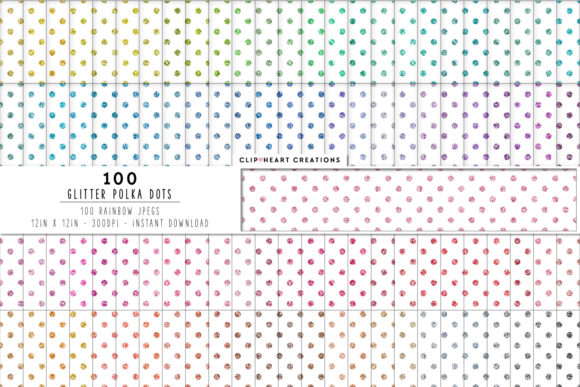
100 Glitter Polka Dot Papers: A Digital Resource for Creative Projects
When digital design assets combine versatility with visual appeal, they open doors for creators across many fields. The collection of 100 Glitter Polka Dot Papers offers precisely such a resource, providing a wide spectrum of patterns that can elevate everything from classroom materials to professional branding. Understanding what this collection contains, how it works in practice, and where it fits into real-world workflows helps anyone make informed decisions about incorporating these digital papers into their projects.
What the Collection Delivers: Specs That Matter
Digital paper collections vary widely in quality and usability. This particular set distinguishes itself through several concrete specifications that directly affect how the files perform in different environments. Each of the 100 Glitter Polka Dot Papers comes as a separate JPEG file, which means users can access individual patterns without navigating through layered master files or extracting pages from a PDF. The JPEG format works across virtually all operating systems, design software, and printing services, removing compatibility barriers that sometimes arise with proprietary file types.
Resolution stands as one of the most critical factors when evaluating digital papers. These files arrive at 300 dots per inch, the standard resolution for professional printing. At this density, the glitter effects and polka dot patterns retain crispness and detail even when printed at full size. The 12-inch by 12-inch dimensions match common scrapbooking and card-making formats, but the square proportion also works well for digital framing, social media graphics, and packaging design. With each file measuring 3600 by 3600 pixels, users have enough resolution to scale the patterns down for smaller items or crop sections for targeted use without losing quality.
The absence of watermarks deserves special attention. Many digital paper samples include visible watermarks that complicate previewing or force users to imagine the final appearance. Here, every file arrives clean, allowing immediate use in mockups, test prints, and client presentations. This practical detail reduces friction during the design process and lets creators evaluate patterns in context before committing to a final layout.
The Visual Range: Glitter Meets Polka Dot
Polka dot patterns carry a long history in design, often associated with playfulness, retro aesthetics, or whimsical charm. The addition of glitter effects transforms these classic dots into something more textured and luminous. 100 Glitter Polka Dot Papers explore this combination across what appears to be a broad color palette and dot scale range, though the exact variety depends on the specific set.
The interplay between glitter and polka dots creates visual depth that flat patterns cannot achieve. Glitter introduces variation in light reflection, making the surface appear to shift as viewing angles change. When applied to polka dots, this effect can make the dots seem dimensional, as if they sit slightly above the background. This quality proves particularly valuable in digital scrapbooking, where layered elements benefit from apparent texture. In print applications, the glitter effect translates to a subtle sheen that catches light without overwhelming the design.
Dot spacing and size likely vary across the collection, giving users options between dense, closely packed dots and larger, more widely spaced circles. Some papers may feature uniformly sized dots, while others could present graduated or mixed diameters. This variety allows designers to select patterns that complement specific project scales—smaller dots work well for backgrounds on standard letter-sized documents, while larger dots become statement elements on greeting cards or gift wraps.
Printing Considerations for Glitter Polka Dot Papers
Printing digital papers at home or through a professional service requires attention to several variables. The 300 DPI resolution of 100 Glitter Polka Dot Papers aligns with standard commercial printing requirements, but home printers may need adjustments. Inkjet printers typically handle glitter effects well on premium photo paper, producing the reflective quality that makes these patterns stand out. Laser printers, while faster, may render glitter effects more matte, so test prints help determine whether the output matches expectations.
Paper selection matters significantly. Glossy or semi-gloss papers enhance the shimmer of glitter dots, while matte papers absorb more light and reduce the reflective effect. For scrapbooking and card making, heavy cardstock around 80 to 100 pounds provides durability without jamming printers. Printable vinyl offers another option for sticker-making, where the glitter pattern becomes part of labels, decals, or planner decorations.
Color calibration deserves attention as well. The JPEG files come with embedded color profiles, but monitors display colors using RGB while printers use CMYK. Some shifting between screen and printed output is normal, particularly with metallic or glitter tones. Running a single test page with a few representative patterns helps identify any discrepancies before printing larger quantities. Many designers keep a printed swatch book of their favorite 100 Glitter Polka Dot Papers patterns for quick reference during projects.
Digital Applications Beyond Print
While these papers print beautifully, their digital applications are equally compelling. The square 3600-pixel format fits directly into social media templates, blog graphics, and YouTube thumbnails. Designers can use individual patterns as backgrounds for quote cards, product mockups, or website headers. The glitter effect adds visual interest on screen without the bandwidth concerns that come with video backgrounds or complex animations.
Presentation design represents an underappreciated use case. Teachers preparing slides for classroom instruction, business professionals building pitch decks, or speakers creating visual aids can pull from 100 Glitter Polka Dot Papers to add tasteful background patterns. The key is restraint—using a subtle polka dot pattern on a single slide or as a section divider rather than across every page. The glitter effect, when scaled appropriately for projection, adds a professional polish without distracting from content.
Digital scrapbooking and memory keeping have grown into substantial creative communities. These papers integrate directly into software like Adobe Photoshop, Canva, Procreate, and Affinity Photo. The JPEG format means no complex import processes; simply drag the file into the workspace, resize as needed, and position it within the project. Many digital scrapbookers build layered layouts with multiple 100 Glitter Polka Dot Papers patterns, combining them with photos, journaling cards, and embellishments for cohesive pages.
Creative Workflows and Integration
Organizing a collection of this size requires some thought. With 100 individual files, establishing a naming convention or folder structure early saves time later. Some users sort by color family, grouping warm tones together and cool tones separately. Others organize by dot size or density, keeping busy patterns in one folder and subtle patterns in another. A few creators create master preview sheets—collages of thumbnail images printed on a single page—for quick reference without opening files individually.
Batch processing techniques help when using multiple patterns in a single project. For example, a party invitation suite might use one 100 Glitter Polka Dot Papers pattern for the main invitation, a complementary pattern for the response card, and a third for the envelope liner. Opening each file, adjusting dimensions, and exporting for print becomes repetitive. Learning to use actions or presets in design software streamlines this workflow, applying consistent settings across multiple files automatically.
Layering techniques expand creative possibilities. A single polka dot pattern can serve as a base, while additional papers from the collection become cut-out shapes, borders, or frames. The consistent resolution across all files means layering doesn't introduce quality mismatches. Designers can also adjust opacity, blend modes, and layer masks to create custom effects, fading patterns in and out or combining them with solid colors and photographs.
Practical Project Ideas Across Different Fields
Event planners and party hosts find natural uses for glitter polka dot papers. Birthday invitations, thank-you tags, favor boxes, and banner decorations benefit from the festive quality of these patterns. For children's parties, bright colors with small dots create a playful atmosphere. For adult celebrations, more subdued glitter patterns on darker backgrounds add elegance. The 12-inch square format works well for printing party hats, cupcake toppers, and table placemats when scaled appropriately.
Educators can incorporate these papers into classroom materials. Bulletin board backgrounds, name tags, reward charts, and center signs gain visual appeal with polka dot patterns. The glitter effect, while decorative in print, also serves a practical purpose: the slight texture and sheen help visually distinguish different areas of a classroom display. For digital learning materials, these papers create consistent backgrounds for worksheets, presentation slides, and home communication folders.
Small business owners and entrepreneurs use patterned papers for product packaging, especially in crafts, beauty, and gift markets. A set of 100 Glitter Polka Dot Papers provides enough variety to maintain brand consistency across multiple product lines while allowing seasonal or promotional variations. Soap labels, candle jars, gift boxes, and tissue paper inserts all benefit from the cohesive look that a unified paper collection provides. The high-resolution JPEG files print cleanly on adhesive paper for labels or on lightweight cardstock for box wraps.
Hobbyist crafters working in card making, journaling, or planner decoration appreciate the ready-to-use nature of digital papers. Rather than hand-painting or stamping polka dots—which requires time, skill, and consistency—they can print patterns instantly. The 100 Glitter Polka Dot Papers eliminate the variability of handmade patterns while still allowing for custom sizing, cropping, and color adjustments within design software. For crafters who sell finished items, the professional appearance of printed digital papers often commands higher prices than handmade alternatives.
Observing Real-World Usage Patterns
Across creative communities, certain patterns from multi-paper collections become favorites while others serve specialized roles. Bright gold and silver glitter polka dot papers tend to appear most frequently in celebration-related projects—birthdays, weddings, holidays, and achievements. Pastel shades with subtle glitter find homes in baby showers, spring-themed decor, and feminine branding. Dark backgrounds with light or metallic dots create dramatic contrast that works well for evening events, formal invitations, and sophisticated packaging.
The size of the polka dots influences how the pattern reads in different contexts. Small dots register as texture from a distance, adding depth without immediately revealing the pattern. Large dots make a bolder statement, becoming a focal point rather than a background element. Users working with 100 Glitter Polka Dot Papers often select dot size based on the viewing distance of the finished project—small items like gift tags benefit from smaller dots, while larger displays like booth backdrops can handle bigger, more prominent patterns.
Layering multiple patterns from the same collection creates a cohesive branded or themed look. A consistent color palette across the papers allows designers to mix and match without visual conflict. For example, using a dense polka dot pattern for the main background and a sparser pattern for accent strips maintains visual interest while preserving readability and structure. This approach works especially well in digital scrapbooking, where multiple patterned papers often appear on a single page layout.
Technical Durability and Long-Term Access
JPEG files offer advantages beyond compatibility. They compress efficiently, so 100 high-resolution images remain manageable in total file size. Storage on hard drives, cloud services, or portable media proceeds without the bloat that can occur with layered file formats. For users who archive their design resources, JPEG files remain readable across decades of software updates, unlike proprietary formats that may become obsolete.
The 3600-pixel resolution provides headroom for future use. As display technology advances and print services offer larger formats, having high-resolution source files means existing projects can scale up without degradation. A pattern used today for a 12-inch scrapbook page could next year become part of a 24-inch poster or a website hero image. The 100 Glitter Polka Dot Papers collection, properly archived, remains a usable resource for years rather than a single-use purchase.
Backup strategies for digital paper collections deserve consideration. Users who invest time in organizing and sorting 100 files should maintain at least two copies in separate locations—one locally on a computer or external drive, and one in cloud storage. Compressing the folder into a ZIP archive simplifies backup while preserving folder structure and file names. This approach also facilitates sharing the collection across devices, allowing access from a desktop, laptop, and tablet without transferring individual files each time.
The glitter effect in JPEG format presents a unique characteristic worth noting: the shimmer appears as a visual illusion created by pixel variation rather than actual metallic particles. This means the effect never flakes, fades, or wears off as physical glitter does. Cards and decorations made with these papers remain pristine through handling, storage, and display. For items intended to last years—like scrapbooks, memory albums, or heirloom-quality invitations—this durability adds real value.
Working Within the Limitations
No digital resource is perfect for every situation, and understanding the limitations of 100 Glitter Polka Dot Papers helps users plan accordingly. The JPEG format, while widely compatible, does not support transparency. Users who need to place a polka dot pattern over a photo or colored background must cut out the paper shape within their design software rather than relying on an alpha channel. This adds a step to the workflow but is manageable with any program that supports layer masks or selection tools.
Color accuracy varies between screens and print outputs. The glitter effect, in particular, can appear differently on glossy versus matte monitors and on calibrated versus uncalibrated displays. Ordering a single test print from a professional service before committing to large print runs helps avoid surprises. Many designers also adjust brightness and contrast to compensate for differences between on-screen appearance and printed results.
The fixed 12-inch square format means users working with non-square projects must resize or crop. Standard letter-sized documents (8.5 by 11 inches) require cropping the pattern to fit, which changes the composition unless the user plans for centering. This is not a flaw of the collection but a practical consideration for those whose primary projects use rectangular formats. Creating reusable templates with the correct dimensions saves time when working with non-square outputs.
Maximizing Value from the Full Collection
Having 100 distinct patterns provides creative latitude that smaller sets cannot match. Users can assign specific patterns to recurring projects, creating visual systems that help organize work. A teacher might use red glitter polka dots for graded materials, blue for parent communications, and green for classroom reference sheets. A small business owner could rotate patterns seasonally, keeping packaging fresh without redesigning entirely. A scrapbooker might dedicate certain patterns to specific family members or events, building visual consistency across albums.
Combining digital papers with other design elements extends their utility. Solid-colored cardstock, metallic foils, ribbon, and embellishments all complement glitter polka dot patterns. The key is balance—letting the paper serve as a foundation rather than overwhelming the composition. Many experienced crafters use polka dot papers on approximately 30 to 50 percent of a project's surface, reserving solid areas for text, photos, and focal points. This ratio maintains visual interest while ensuring readability and structure.
For users who create digital products—printable planners, party kits, teaching resources, or social media templates—the 100 Glitter Polka Dot Papers become part of a product library. Each pattern can appear across multiple items, creating branded collections that customers recognize. The consistent quality across the set means no single product suffers from a poorly rendered pattern. Over time, the collection pays for itself through repeated use across dozens or hundreds of individual projects.