25 Seamless Patterns Geometric SvgBundle: What to Know Before You Buy or Use It
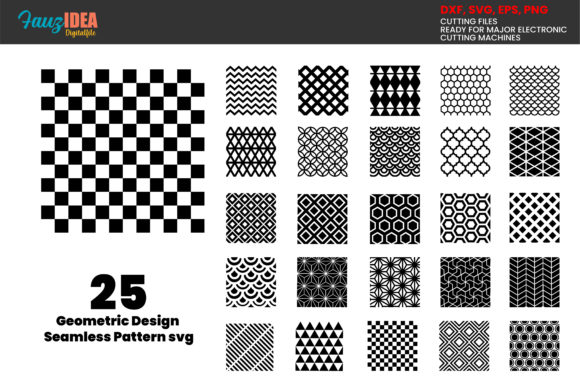
If you have spent any time browsing for design assets, you have likely come across the 25 Seamless Patterns Geometric SvgBundle or similar collections. At first glance, it looks like a straightforward purchase: a set of geometric patterns, ready to download, and compatible with your Cricut or Silhouette machine. But there is more to getting good results than simply clicking buy and hitting print. Whether you are a small business owner making products to sell, a hobbyist decorating your home, or a freelancer building client presentations, understanding what this bundle actually contains—and how to use it correctly—can save you time, frustration, and wasted materials.
Let us walk through the common mistakes people make with geometric SVG pattern bundles, why those mistakes hurt your results, and how to get the most out of your files from the very first cut.
Mistake One: Assuming All Files in the Bundle Are the Same
Many buyers open the ZIP folder and feel overwhelmed by all the formats. They see SVG, EPS, PNG, DXF, and maybe wonder why five different file types are included for one pattern set. The 25 Seamless Patterns Geometric SvgBundle includes all these formats for a reason. Each one serves a different purpose, and using the wrong format can lead to jagged edges, failed cuts, or lost detail.
For example, if you open the PNG version in Cricut Design Space instead of the SVG or DXF file, you may lose the transparent background or end up with a raster image that does not scale cleanly. The PNG is excellent for previews or web use, but the SVG or EPS is what your cutting machine needs for crisp, scalable lines. Take a moment to understand which format matches your software. Cricut users generally want SVG or DXF. Silhouette users often prefer SVG or EPS. If you ever feel unsure, the product description notes that you can request another format—so it is worth asking before you start a project you care about.
Mistake Two: Assuming "Seamless" Means No Setup Required
The word seamless can be misleading to someone new to pattern design. A seamless pattern means the design tiles infinitely without visible seams when repeated. That is a huge time saver because you do not have to manually align edges. But it does not mean the file is ready to use on a mug, a T-shirt, or a tote bag without any preparation.
You still need to set the pattern size relative to your project. If you apply the pattern without adjusting the scale, it might look too small or too large on your final product. A common mistake is to upload the SVG into your design software and immediately cut, only to find that the geometric shapes repeat in a way that looks cramped or awkward. Take advantage of the seamless nature by testing the scale on a small piece of material first. This is especially important for entrepreneurs who sell physical products—a poorly scaled pattern can make a product look unprofessional and hurt your reputation.
Mistake Three: Ignoring the License and Usage Terms
It is easy to assume that buying a digital bundle gives you unlimited commercial rights. That is not always the case, and the 25 Seamless Patterns Geometric SvgBundle is typically sold for both personal and small commercial use. But you need to read the specific terms included with your purchase. Some bundles restrict the number of products you can sell, or they require you to modify the design before using it in merchandise.
If you are a small business owner selling on Etsy or at craft fairs, the last thing you want is a legal issue over pattern rights. Check whether the license allows you to use the patterns as-is on products for sale, or if you need to alter them. When in doubt, contact the seller directly. Most creators are happy to clarify, and getting a written confirmation protects you down the road.
Mistake Four: Overlooking File Quality Before Cutting
Digital files can sometimes have issues: stray anchor points, unclosed paths, or overlapping shapes that cause your machine to cut incorrectly. This is not a knock on the bundle—most bundles are well-made—but it is something to check before you commit to an expensive material like heat transfer vinyl or adhesive vinyl.
Open the SVG file in a free vector editor like Inkscape or in your design software. Zoom in on the pattern to look for any irregularities. If you see anything odd, you can often fix it by simplifying the path or using a union command. For beginners, this may sound technical, but it is a simple step that prevents wasted vinyl and frustration. The description of this bundle mentions that if a file is damaged during download, you should contact the seller. That is good to know. But checking the file yourself before you cut is a habit that will serve you well on every project, not just this one.
Mistake Five: Using the Wrong Material for the Pattern Style
Geometric designs, especially seamless ones, can look stunning on many surfaces. But some materials work better than others. A tightly packed geometric pattern may not show well on a textured surface like canvas or rough fabric. A pattern with very thin lines may not cut reliably from glitter vinyl. Think about how the geometric shapes will behave on your chosen material before you open the file.
If you are new to working with patterns, start with a smooth surface like cardstock, adhesive vinyl on glass, or heat transfer vinyl on a cotton T-shirt. These surfaces let the geometric shapes shine without competing texture. As you gain confidence, experiment with more challenging materials. The bundle includes 25 different patterns, so you have room to test and find what works best for your projects.
Mistake Six: Trying to Use the Bundle Without Proper Software
You do not need expensive design software to use these files, but you do need something that can handle vector formats. Cricut Design Space and Silhouette Studio are the most common choices for cutting machines. However, if you want to customize the pattern—change colors, rotate elements, or adjust spacing—you will need a vector editor like Adobe Illustrator, CorelDRAW, Inkscape, or Affinity Designer.
A practical approach: use the DXF or SVG directly in your cutting software for simple projects. If you want to modify the pattern before cutting, open the EPS or SVG in a vector editor first. The bundle includes both formats, so you have flexibility. For beginners, Inkscape is free and works well for simple edits like resizing or recoloring. Learning basic vector editing will unlock far more creative potential than relying solely on the default settings in your cutting program.
Mistake Seven: Overlooking the Instant Download and Organization
Because these files are available for download as soon as payment clears, there is a temptation to grab them quickly and start cutting right away. But a little organization upfront saves time later. Create a folder on your computer specifically for SVG pattern bundles. Name each pattern with a descriptive title so you can find it later. If you download the files and leave them in your Downloads folder, you will eventually have dozens of unlabeled folders that are hard to search through.
Take fifteen minutes after purchase to unzip the folder, review the patterns, and rename them if needed. The bundle includes 25 designs, so keeping them organized means you can actually use them instead of forgetting what you own. This small habit is especially helpful for freelancers and educators who manage multiple projects and need to locate a specific pattern quickly.
Mistake Eight: Assuming You Cannot Request Help or Custom Formats
The product description explicitly states that you may request other file formats and that the seller will see what they can do. Many buyers never take advantage of this. If you need a format that is not included, or if you have a specific software requirement, ask. Sellers usually want you to be successful with their product. Similarly, if you encounter an error or a damaged file, contact them directly. Digital files can sometimes corrupt during upload or download, and a quick message usually resolves the issue.
Do not struggle in silence or assume that a file problem is your fault. Reaching out is part of being a smart consumer, and it protects your investment in the bundle.
Putting It All Together: A Smarter Way to Use Your Geometric Pattern Bundle
The 25 Seamless Patterns Geometric SvgBundle is a versatile resource for anyone who creates physical or digital products. But like any tool, its value depends on how you use it. By choosing the right file format, checking the file quality before cutting, considering your material, and organizing your downloads, you avoid the common pitfalls that lead to wasted time and materials.
For professionals and entrepreneurs, these patterns can save hours of design work and give your projects a polished, consistent look. For hobbyists and beginners, they offer a low-risk way to explore geometric design without needing advanced drawing skills. The key is to approach the bundle with a bit of preparation and realistic expectations.
Before you download, think about your project, your software, and your material. Open the patterns, test one on a small scale, and see how it performs. If something goes wrong, remember that the seller is just a message away. With a little care, these 25 seamless geometric patterns can become a go-to resource in your creative toolkit for years to come.