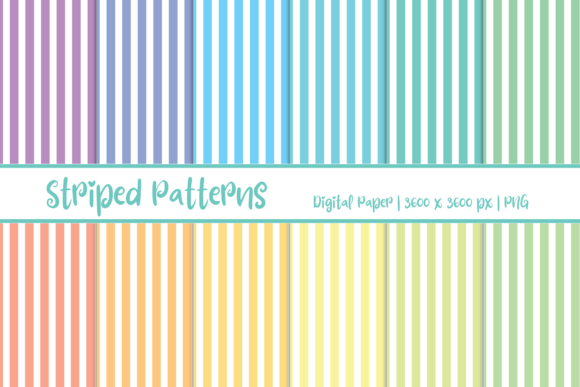
Integrating Striped Patterns Digital Paper into Efficient Design and Content Workflows
Consistency and speed are critical in modern content creation. Whether you are managing a brand’s social media presence, designing print materials for a client, or building a personal project, the assets you use directly impact both the quality of the output and the efficiency of your process. Striped Patterns Digital Paper offers a focused, high-resolution resource that fits directly into this need. With 12 distinct PNG files at 3600 x 3600 pixels, this set is designed to be a practical, reusable component in a wide range of digital and print workflows. This set addresses a recurring need in production environments: the requirement for backgrounds that are both aesthetically pleasing and technically robust. The 12 variations provide enough diversity to suit different themes while maintaining a cohesive style that defines a project’s visual tone.
The Foundation: Why Asset Quality Dictates Workflow Speed
Before diving into specific use cases, it is important to understand what Striped Patterns Digital Paper brings to a project from a technical standpoint. The 3600 x 3600 pixel resolution is a key factor. At 300 DPI, this translates to a 12x12 inch printable area, suitable for standard scrapbook pages, card fronts, and many marketing collateral pieces. For digital use, this resolution provides ample room for cropping, scaling down for web use without losing sharpness, or using sections of the pattern for varied effects.
The PNG format is equally important for workflow integration. PNG files support lossless compression, meaning no data is lost when saving and resaving. This maintains pattern integrity during complex edits. While these specific papers do not include transparency, the PNG format ensures broad compatibility across platforms—from Adobe Photoshop and Illustrator to Canva, Procreate, and open-source tools like GIMP. This universality means no time wasted converting files or troubleshooting compatibility issues. Stripes, as a pattern type, also offer specific practical advantages. They are classic, non-distracting, and can add a sense of structure, order, and direction to a layout, guiding the viewer’s eye across the content.
Pre-Production: Using Patterns to Accelerate Planning and Client Approval
The earliest stages of a project often involve the most decision fatigue. What color palette works? What background texture complements the typography? Having a curated set of 12 striped patterns immediately reduces the available choices, which paradoxically speeds up the decision process. Instead of generating patterns from scratch or searching through stock libraries, you can place these patterns into mood boards or prototypes. This shift from creation to curation is a core efficiency principle.
The planning phase is where resource allocation is decided. Choosing to use Striped Patterns Digital Paper in a project plan frees up budget and time that would otherwise be spent on a custom photoshoot or illustration. For a marketing manager planning a quarterly content calendar, having this asset set means you can confidently schedule design sprints knowing that the foundational background elements are ready to go. This reduces the lead time for graphic production. For freelancers and agency professionals, presenting a client with a mockup that uses a high-quality pattern can convey a polished, professional direction faster than a wireframe. The pattern acts as a stand-in that closely resembles the final product. This allows you to get approval on the structural design before investing time in custom asset creation. Educators and bloggers can use these patterns to quickly build the visual structure of a course slide deck or a blog post featured image, ensuring that the background supports the content rather than distracting from it.
Streamlined Execution: Applying Striped Patterns Across Project Types
The true test of a digital asset is how smoothly it integrates into the actual production phase. Here are specific workflow integrations for common professional scenarios.
Social Media and Digital Marketing Campaigns
Marketing teams often need to produce a high volume of assets for a single campaign—Instagram stories, LinkedIn banners, Facebook ads, and email headers. Striped Patterns Digital Paper can serve as the cohesive visual thread across these formats. To implement efficiently: create a master Photoshop or Canva file with the pattern as a background layer. Duplicate this file for each platform’s required dimensions. By locking the pattern layer, you ensure that the background remains consistent while you swap out copy, headlines, and calls-to-action. This batch-processing method drastically reduces production time and enforces brand consistency. The vertical or horizontal nature of stripes can also be used strategically to add movement or direction to a static design.
Print Design and Invitations
For card creation, invitations, and scrapbooking, the 300 DPI native resolution of the 3600x3600px files ensures that the stripes remain crisp and sharp. In your print workflow, import the PNG into your layout software such as InDesign, Affinity Publisher, or even Word. Set the scaling to 100% to utilize the full resolution. Because the files are individual PNGs, you can easily apply them to different panels of a multi-fold invitation or use them as envelope liners. Small business owners who create print-on-demand products can set up templates with these patterns, allowing for rapid customization without needing to redesign the background from scratch each time. When preparing for print, remember to convert the files to CMYK and perform a soft proof to check how the vibrant stripes will appear on paper.
Web and UI Backgrounds
While patterns add visual interest in web design, performance is a concern. A 3600x3600 PNG is large for direct web use. The practical workflow here involves optimizing the image. Open the pattern in an image editor and resize it to the maximum display size needed on your site, such as 1920x1080px for a hero section. Export as a compressed PNG or JPEG. Alternatively, use the pattern as a repeating CSS background if the design allows for seamless tiling. By having the high-resolution master file, you control exactly how much compression and scaling is applied, ensuring the final web asset is both beautiful and performant. For email marketing, using a subtle striped pattern in an email header can increase visual appeal without triggering spam filters that often flag large, complex image-only emails.
Digital Products and Lead Magnets
Freelancers, online course creators, and publishers often create PDF checklists, planners, or workbooks. A subtle striped background can add a premium feel to these digital products. The workflow involves importing the PNG into your layout software, setting it as a background, and adjusting the opacity to ensure text readability. This transforms a simple document into a branded asset. When creating templates for sale on platforms like Etsy, providing the pattern as a flat, high-resolution PNG within a well-organized zip file is the industry standard. It gives buyers immediate access to a professional-grade resource that they can drag and drop into their own projects.
Organizing Digital Assets for Repeatable, Consistent Use
A disorganized asset library negates the efficiency gains of having high-quality resources. When you acquire Striped Patterns Digital Paper, invest a few minutes in setup to save hours later.
First, establish a consistent naming convention. Instead of pattern_01.png, rename files to something descriptive like striped_navy_white_12x12.png or classic_blue_stripe_3600.png. This makes finding the right pattern intuitive, even months later. Second, create a dedicated folder within your main design assets directory, for example Assets/Backgrounds/Striped_Patterns/. If you use a Digital Asset Management (DAM) system or a cloud storage service like Google Drive or Dropbox, tag the files with relevant keywords such as striped, pattern, background, texture, and high-res.
Third, consider building template files. If you frequently design social media banners, create a template in Canva or Photoshop that has a placeholder layer linked to these patterns. This turns the selection of a background into a simple dropdown menu or a quick drag-and-drop action. This is particularly valuable for entrepreneurs and small business owners who may not have dedicated design teams but need to maintain a professional visual standard. When working within a team, storing the original files in a shared cloud location ensures that all team members access the same source of truth, preventing version control issues. Establishing a protocol—such as always importing the original 3600x3600 PNG and scaling down, rather than scaling up a smaller version—maintains sharpness across all deliverables.
Quality Control: Ensuring Output Consistency Across Print and Digital
One common pitfall in cross-media design is color shift. A striped pattern that looks vibrant on a screen might appear dull in print. Because Striped Patterns Digital Paper is provided in standard RGB, you will need to manage color profiles for print workflows. If you are printing, convert the file to CMYK in your editing software and perform a soft proof to see how the colors will translate. The high resolution gives you the freedom to make these adjustments without introducing artifacts.
For digital workflows, perform a quick check on how the pattern interacts with text and other foreground elements. Striped backgrounds can sometimes create visual noise or moire patterns when displayed on certain screens. To mitigate this, you can slightly blur the pattern layer in the specific area behind text, or use a semi-transparent overlay to mute the contrast. Having the master file at 3600x3600 means you have plenty of pixel data to work with for these kinds of adjustments without degrading the overall image quality. Long-term, owning the asset in a lossless format like PNG is often more practical than relying on subscription-based pattern tools, as you retain continuous access to the original files without recurring costs.
Striped Patterns Digital Paper is more than a collection of attractive backgrounds. It is a workflow catalyst. By providing high-resolution, versatile files in a universally compatible format, it allows creators and professionals to bypass the resource-intensive steps of pattern creation and sourcing. Whether you are a marketer producing a campaign, a freelancer designing invitations, or an educator building course materials, the practical value lies in the time saved and the consistency achieved. Integrating these 12 patterns into your asset library is a straightforward decision that pays dividends in project execution efficiency and visual quality.