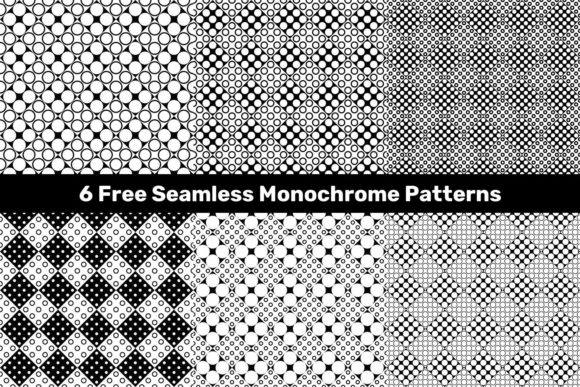
6 Free Seamless Circle Patterns – Creative Design Assets
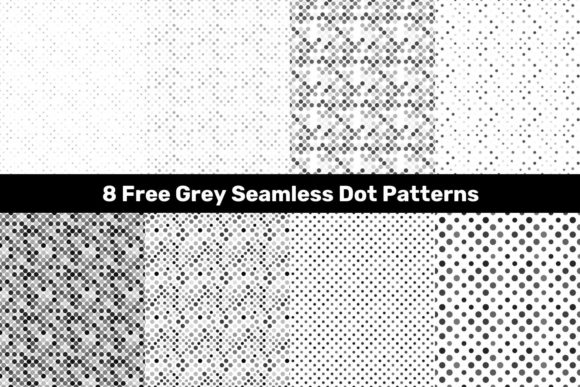
Patterns are one of the most efficient ways to add depth, rhythm, and visual interest to a design. They can turn a flat layout into something tactile, a simple background into a story, and a generic composition into a branded experience. Yet finding high-quality, ready-to-use patterns that don't cost anything—and that you can modify without restrictions—remains surprisingly hard. That is exactly where the 6 Free Seamless Circle Patterns package changes the game. This resource gives you six monochrome circle-based patterns in multiple formats: JPG at a generous 5000x5000 resolution, plus editable vector .EPS and .AI files. Whether you are a seasoned designer, a small business owner building your own marketing materials, or a hobbyist exploring new visual directions, these patterns offer a solid foundation for countless projects.
What Makes These Patterns Worth Your Time
Before diving into specific uses, it helps to understand what you are actually working with. Monochrome circle patterns might sound simple, but that simplicity is a strength. Without color distractions, the focus stays on form, spacing, and repetition. The seamless nature means you can tile them across large areas without visible seams, which is essential for backgrounds, wrapping paper, fabric prints, or any surface where continuity matters. The vector formats give you full control over scaling, editing, and combining elements. You can resize a pattern to fit a business card or blow it up for a billboard without losing sharpness. The 5000x5000 JPG versions work well for quick mockups and digital use when you do not want to open a vector editor.
Having six distinct patterns in one package means you are not stuck with a single look. Some may feel dense and geometric, others more airy and minimal. That range lets you match the pattern to the mood of your project rather than forcing your project to fit the pattern.
Where to Use Seamless Circle Patterns in Real Projects
The practical applications for these patterns are far wider than you might initially think. Below are several areas where they can make an immediate difference, along with specific examples for each.
Branding and Identity Work
A pattern can become a signature element of a brand. Think about how often you see a brand use a subtle repeating motif on its website, packaging, or stationery. With the 6 Free Seamless Circle Patterns, you can select one pattern that aligns with the brand personality and use it consistently. For a tech startup, a tight concentric circle pattern might suggest precision and connectivity. For a wellness brand, a looser, overlapping circle pattern can evoke calm and community. Because the files are vector, you can recolor them instantly to match brand colors without losing quality. You can also scale the pattern differently for various touchpoints—small and subtle on a letterhead, larger and more pronounced on a tote bag.
Packaging and Product Design
Product packaging often relies on patterns to create shelf appeal. A monochrome circle pattern printed on a box, a tube, or a label adds texture without overwhelming the product name or logo. Because the patterns are seamless, they wrap around cylindrical objects like bottles or jars without awkward breaks. You can also use them as interior liners for boxes, as tissue paper designs, or as wrapping paper for gifts. The high-resolution JPG files are especially useful for quick mockups when testing packaging concepts, while the vector files give you precision when sending final artwork to a printer.
Web and Digital Design
Digital projects benefit from patterns in different ways. A subtle repeating circle pattern used as a website background can break up large white spaces and add a tactile feel without loading heavy images. Because these patterns are monochrome, they do not compete with colorful content. You can also use them as hover states, dividers between sections, or even as animated background elements in video projects. Social media graphics, presentation slides, and email headers all become more engaging when you add a thoughtful pattern behind your text or imagery. The 5000x5000 JPG files load quickly enough for web use if compressed properly, and the vector files allow you to export exact sizes for any screen resolution.
Print Collateral and Stationery
Flyers, brochures, business cards, notebooks, and planners all benefit from a cohesive pattern system. A circle pattern used sparingly on a business card back can set your card apart from the hundreds of plain white ones. On a brochure, a pattern can act as a full-bleed background on a cover or as a subtle watermark on interior pages. Because the patterns are seamless, you can tile them across large print runs without worrying about mismatched edges. The vector formats are ideal for print because they give you precise control over line weights and spacing, ensuring the pattern reproduces cleanly at any size.
Adapting Patterns for Different Audiences and Contexts
Not every audience responds to the same visual language. The beauty of working with these six patterns is that you can adapt them to suit different demographics and platforms without starting from scratch.
For a younger, trend-driven audience on platforms like Instagram or TikTok, consider using a bolder, denser circle pattern as a full-screen background for quote graphics or product teasers. Monochrome patterns perform well in short-form video because they do not introduce color noise that distracts from the main subject. For a more professional audience on LinkedIn or in corporate presentations, choose a pattern with wider spacing and softer lines. Use it sparingly—perhaps as a subtle header background or a section divider. The pattern adds a polished, custom feel without appearing frivolous.
Educators and hobbyists can use these patterns for printable worksheets, classroom decorations, or craft templates. Because the patterns are monochrome, they print cleanly on standard printers without consuming excessive ink. You can also use them as coloring pages for children or adults by printing the pattern at a larger scale and letting the circles serve as a meditative repeating shape to fill in.
For small business owners who handle their own marketing, these patterns offer a shortcut to professional-looking materials. Instead of hiring a designer to create a custom pattern from scratch, you can download this package, open the vector file, change the stroke color to match your brand, and apply it across your packaging, website, and social media. The time saved can be reinvested into other parts of your business.
Practical Tips for Getting the Most Out of These Patterns
Having a great resource is only half the battle. Knowing how to use it effectively ensures your final design looks intentional and polished. Here are some actionable recommendations for working with the 6 Free Seamless Circle Patterns.
Scale with purpose. The same pattern used at different scales communicates different things. A small, tight scale feels detailed and textured, almost like a fabric weave. A large, loose scale feels more graphic and modern. Experiment with scaling the pattern up or down inside your design software to find the right balance for your specific layout.
Change the stroke weight. Since these are vector files, you can adjust the thickness of the circle outlines. Thicker strokes create bold, statement patterns. Thinner strokes feel delicate and sophisticated. If you are layering the pattern over photography, thinner strokes usually work better because they do not overpower the image.
Use negative space. Circle patterns naturally create both positive and negative space. You can place text inside the empty areas of a pattern if the circles are spaced widely enough, or you can use the pattern itself as a text mask. Experiment with positioning your content in the gaps rather than always placing it on top of the pattern.
Combine patterns. You are not limited to using only one pattern per project. Try pairing a dense circle pattern with a more open one to create contrast within a single layout. For example, use the dense pattern on a sidebar and the open pattern on the main content area. The monochrome nature of all six patterns makes them easy to mix without visual conflict.
Recolor strategically. Even though the patterns are monochrome in their original form, you can recolor them in your vector software. A black-on-white pattern feels classic and clean. A white-on-black pattern feels dramatic and modern. A gray-on-cream pattern feels warm and vintage. Try using a brand color as the pattern color and a neutral as the background for a tailored look.
Consider opacity. When using a pattern behind text or photography, reduce the opacity of the pattern layer so it does not compete for attention. A pattern at 10–20% opacity can add texture without sacrificing readability. This technique works particularly well on websites, presentation slides, and print collateral where legibility is paramount.
Real Project Ideas to Try Today
Sometimes the hardest part is knowing where to start. Here are five concrete projects that make excellent use of these seamless circle patterns, along with brief notes on how to approach each one.
Project one: Custom notebook cover. Open the vector file in your preferred software, select a pattern, and scale it to fit a standard notebook size. Recolor it to match a personal brand or aesthetic. Export as a high-resolution PDF and upload to a print-on-demand service. You have a unique product in under an hour.
Project two: Instagram highlight covers. Create a set of nine Instagram story highlight icons using one pattern as a consistent background. Add a simple icon or letter in the center of each circle. The monochrome pattern keeps the set cohesive, and the circle motif ties into the highlight shape naturally.
Project three: Branded gift wrap. Take one of the patterns, scale it to tile across a large sheet, and export it as a high-resolution JPG. Upload it to a custom wrapping paper printing service, or print it at home on large format paper. Add a ribbon in a brand color for a polished finish.
Project four: Presentation template. Build a multi-slide presentation template using a single pattern as a repeating background element. Use it on title slides, section dividers, and closing slides. Keep content slides clean with the pattern only appearing as a subtle footer or sidebar accent.
Project five: Wall art. Scale a pattern to poster size and print it on matte paper. Frame it in a simple black or white frame. The monochrome circle design works well in modern interiors, and because it is geometric, it does not feel dated the way some illustrative prints might.
Keeping Your Work Consistent and Audience-Friendly
One risk when using patterns is overusing them. A pattern should enhance a design, not dominate it. To maintain consistency across a project, limit yourself to one or two patterns from the package and use them across all touchpoints. This creates a visual thread that ties everything together. For audience-friendly results, always test your pattern-based designs at the size and medium where they will actually be seen. A pattern that looks perfect on a full-screen monitor may feel overwhelming on a mobile phone screen. Zoom out. Print a test. Adjust accordingly.
The vector format gives you the freedom to edit, but that freedom also requires discipline. Keep your edits intentional. Ask yourself whether each change serves the overall composition or simply adds visual noise. A well-placed pattern with a single thoughtful adjustment nearly always outperforms a heavily edited pattern that tries to do too much.
Where to Go from Here
The 6 Free Seamless Circle Patterns package is more than just a collection of files. It is a starting point for exploration. Whether you are designing a brand identity, building a website, creating products, or simply experimenting with new visual ideas, these patterns give you a reliable foundation. The combination of high-resolution JPG and editable vector formats means you can move quickly when needed and dive deep when the project demands it. Download the package, open the files, and try at least one of the project ideas mentioned above. Working with a real pattern in a real layout will teach you more about its possibilities than any amount of planning ever could.